CROW, my SaaS for auto repair shops, had a growth problem: my cold-email channel was technically working — emails sending, deliverability fine — and converting almost nobody. I wanted a faster-feedback channel where I'd learn in days, not weeks. Paid ads.
The catch: I'm one person. I didn't want to spend a week in a design tool and another in Ads Manager. So I set a deliberately ambitious goal — go from "let's make ads" to live, paying-traffic ads in a single sitting — and leaned on AI for the parts that don't need a human.
Here's exactly how that went, including the parts that didn't work the first time.
First, an honest scoping decision
The original idea was "a couple of tutorial videos and some ads." I almost reached for an image model to do all of it. That would've been a mistake.
Nano Banana Pro — Google's gemini-3-pro-image — is an image generator, not video. And a "how to use the app" video needs to show the actual app, which means screen recording, not synthetic footage. So I split the work by what AI is genuinely good at:
- Videos → I write the script + storyboard; a human screen-records the real product. AI can't (and shouldn't) fake this.
- Static ads → fully AI-generatable. This is where Nano Banana Pro shines.
The fastest way to waste a day with generative AI is to force one model to do something adjacent to what it's good at. Image models make images. Naming the boundary up front saved me from generating garbage "app demo" footage that no shop owner would trust.
This post is about the ads.
Step 1 — Find the right model (don't guess the ID)
Image-generation model IDs churn. Instead of hardcoding a name from a blog post, I asked the API what my key could actually use:
import httpx

models = httpx.get(
    "https://generativelanguage.googleapis.com/v1beta/models",
    params={"key": API_KEY},
).json()["models"]

for m in models:
    if "image" in m["name"]:
        print(m["name"], "—", m["displayName"])
# gemini-3-pro-image  — Nano Banana Pro
# gemini-2.5-flash-image — Nano Banana
# ...
gemini-3-pro-image it is. Thirty seconds, zero guessing, and it confirmed the key was provisioned for it.
Step 2 — A tiny, reusable generator
The whole image pipeline is one function. Two details matter: responseModalities: ["IMAGE"] to get pixels back, and imageConfig.aspectRatio so I can ask for both feed (1:1) and Story/Reel (9:16) framings from the same prompt.
import base64, httpx

MODEL = "gemini-3-pro-image"  # Nano Banana Pro
ENDPOINT = f"https://generativelanguage.googleapis.com/v1beta/models/{MODEL}:generateContent"

def generate(prompt: str, aspect_ratio: str, out_path: str):
    body = {
        "contents": [{"parts": [{"text": prompt}]}],
        "generationConfig": {
            "responseModalities": ["IMAGE"],
            "imageConfig": {"aspectRatio": aspect_ratio},  # "1:1" | "9:16"
        },
    }
    r = httpx.post(ENDPOINT, params={"key": API_KEY}, json=body, timeout=300)
    r.raise_for_status()
    for part in r.json()["candidates"][0]["content"]["parts"]:
        if "inlineData" in part:
            with open(out_path, "wb") as f:
                f.write(base64.b64decode(part["inlineData"]["data"]))
            return
Complex prompts (light trails, detailed in-UI mockups) sometimes took 30–60s and tripped a default HTTP read timeout. I bumped the timeout to 300s and wrapped each call in a small retry loop. One transient timeout shouldn't kill a batch of eight images.
Step 3 — Prompts that carry the brand (and the headline)
The single biggest reason I chose Nano Banana Pro over a generic image model: it renders text inside the image, legibly. That's usually where most image generators fall apart — and it's exactly what an ad needs.
I wrote one prompt per angle, baking in CROW's real brand palette and the exact headline. For the "VIN intelligence" angle:
Photoreal advertising hero on a dark industrial background (#0F172A). On the left, a vehicle VIN barcode plate. A deep-blue (#2563EB) light-trail flows to a smartphone on the right showing a clean vehicle profile — make/model/year, a maintenance list, and a dollar estimate. Bold sans-serif overlay text reading exactly: "One VIN. The whole job."
Here's what came back, unretouched:
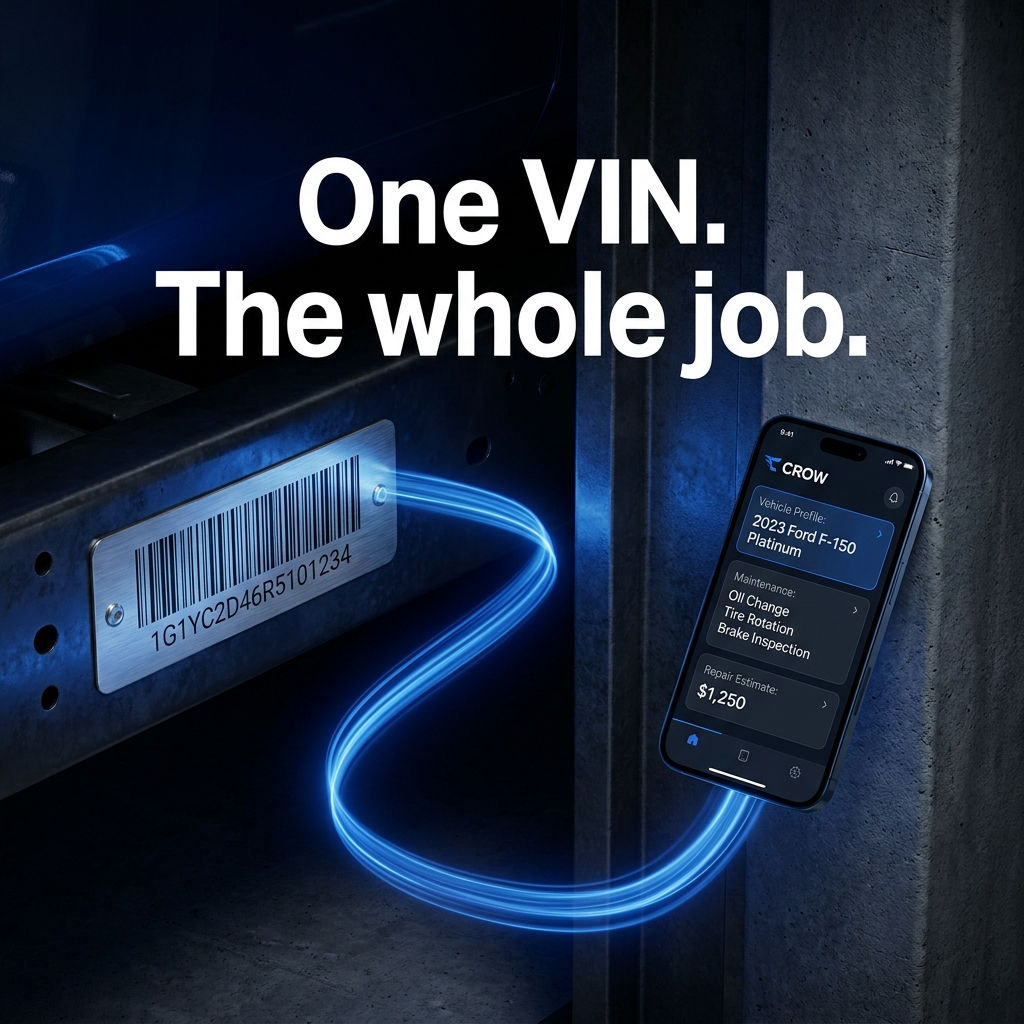
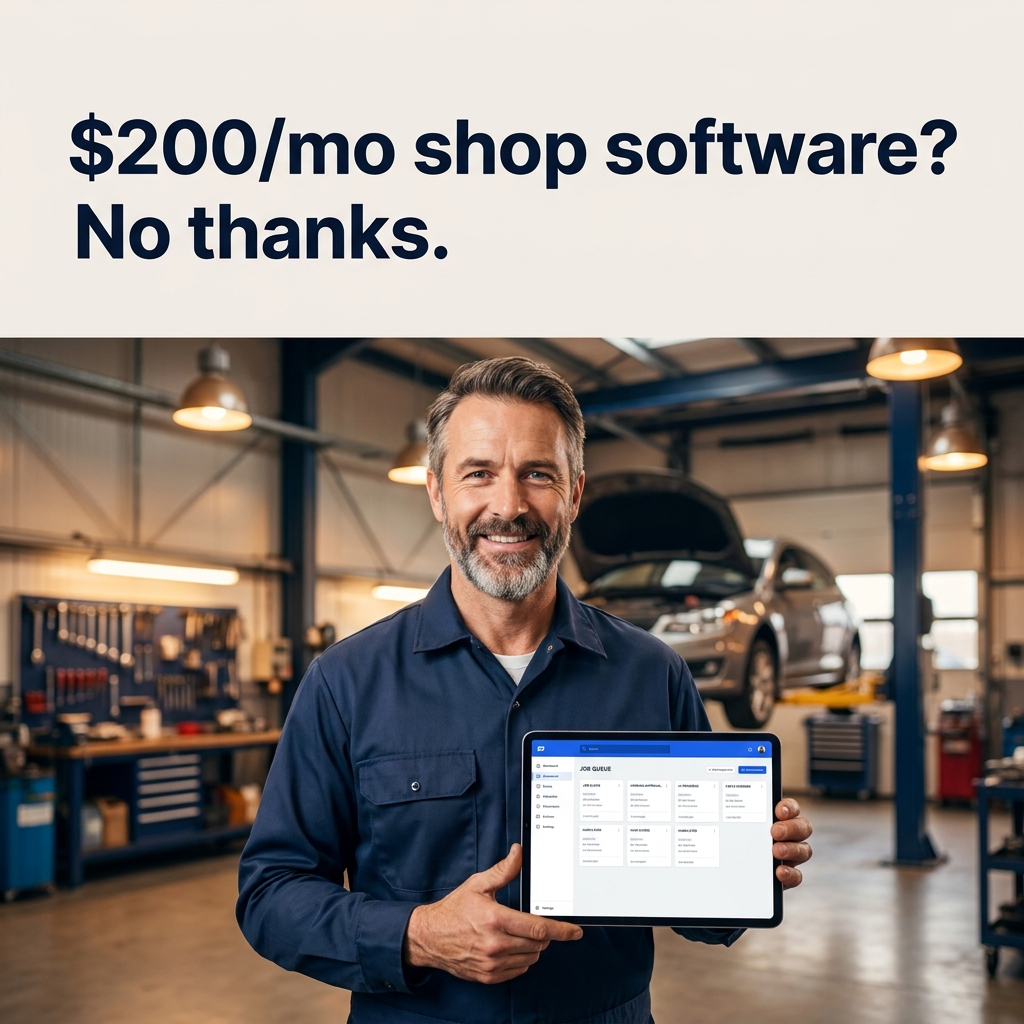
The headline is crisp. The brand blue is right. The phone shows a plausible vehicle profile with a maintenance list and an estimate. I ran four angles — price, all-in-one, simplicity, and VIN — across two sizes each, for eight on-brand creatives in a few minutes.
Step 4 — The gotcha nobody warns you about: getting images into Meta
This is where "fully automated" met reality. The Meta Marketing API attaches creatives by image_hash (a pre-uploaded asset) or image_url — and the path I was using had no image-upload step. My PNGs were local files.
The fix is simpler than it sounds once you understand Meta's behavior: when you pass an image_url, Meta fetches the image and re-hosts its own copy at creative-creation time. So the URL only has to be public for that one fetch. I dropped the files on a throwaway host, Meta grabbed them, and the temporary copy became irrelevant immediately after.
These are ad creatives — they're about to be public anyway, so there's no sensitivity in a momentary public URL. And because Meta re-hosts, the ads don't break if that temp host disappears tomorrow.
Step 5 — Assemble the campaign in code (but ship it paused)
With creatives in hand, the campaign is just four objects, top to bottom:
Campaign
Objective OUTCOME_TRAFFIC, campaign-budget optimization at $7/day. A deliberately small learning budget.
Ad set
Optimize for landing-page views (not raw clicks — I want people who actually load the signup page), targeted to US auto shops.
Creatives
One per angle: the AI image, the copy, a SIGN_UP button, and the destination — my free-trial page.
Ads
Wire each creative to the ad set. Every object created in PAUSED status.
That last word is the important one. The whole structure went up paused — nothing could spend a cent until I'd reviewed every ad and explicitly flipped it on. For anything that touches real money, the automation builds; the human launches.
# pseudocode — each call returns an id used by the next
campaign = create_campaign(objective="OUTCOME_TRAFFIC", daily_budget=700)   # cents
ad_set   = create_ad_set(campaign, optimize_for="LANDING_PAGE_VIEWS",
                         geo=["US"], status="PAUSED")
for angle in ANGLES:
    creative = create_creative(page, link="https://crowapp.ca/register",
                               image_url=angle.url, message=angle.body,
                               headline=angle.headline, cta="SIGN_UP")
    create_ad(ad_set, creative, status="PAUSED")
Step 6 — A 30-second pre-flight, then launch
Before activating, one check that pays for itself: does the landing page actually work? There's no point paying for clicks to a broken signup form. I loaded /register, confirmed the trial flow completed, then set the campaign, ad set, and all four ads to ACTIVE.
Live. In one sitting.
What AI did vs. what I did
| Step | Who |
|---|---|
| Strategy: audience, goal, channel | Me |
| Ad copy + angles | Me (AI as a sounding board) |
| Ad visuals (8 creatives) | Nano Banana Pro |
| Campaign assembly (API) | Automated |
| Review + launch decision | Me |
The pattern I keep coming back to: AI compresses the mechanical middle, and a human owns the judgment at both ends — the strategy going in, and the go/no-go on spend coming out.
The honest results (so far)
I'm not going to show you a hockey-stick chart, because the campaign launched as I was writing this. What I can report:
- Eight on-brand creatives + a live four-ad campaign, start to finish, in an afternoon.
- A clear measurement plan: since I haven't installed a conversion pixel yet, I'm reading cost-per-landing-page-view in Meta alongside the actual trial-signup count in CROW's own admin. Meta can't see my signups without a pixel — so the in-app number is the real scoreboard.
- A defined upgrade path: if it converts, I install a pixel and switch the campaign from "optimize for clicks" to "optimize for actual registrations."
Lessons learned
1. Name the tool's boundary first. Image models make images. Deciding up front that videos needed real screen recording — not AI footage — saved me from a day of plausible-looking garbage.
2. Ask the API which models you have. Don't hardcode a model ID from a six-month-old tutorial. A one-line list models call is the difference between "works" and "404."
3. The text-in-image quality is the whole game for ads. It's the one thing generic generators get wrong and the one thing an ad can't do without.
4. Read the integration's actual contract. "No image upload, but image_url gets re-hosted on fetch" is the kind of detail that turns a blocker into a footnote — but only if you stop and read how the API really behaves.
5. Automate the build, gate the spend. Generating creative and assembling a campaign is mechanical and safe to automate. Launching it spends money — that stays a deliberate, human decision.
The cold-email channel taught me how slowly you learn when you can't read the signal. Ads — even at $7/day — close that loop fast. And with a generative pipeline doing the heavy lifting, standing one up is no longer a project. It's an afternoon.
Building something and want the same kind of AI-accelerated growth loop? Let's talk — or see more of what I built into CROW.